Wednesday, December 12, 2007
Young guys are growing...
On Friday, Bruno Farina and Paolo Mauri are going to take their Master Degree in Computer Science. I'll be present and I have to say that this is a special event for me. I have been mentoring other students before... but the idea that this project become true and available open source is somehow awesome. I am talking about the JDPF project. Paolo and Bruno did a great job and this has been (hoping it is also going to be) a really good learning experience!

Wednesday, December 05, 2007
JDPF (Java Data Processing Framework)
JDPF (www.jdpf.org) is a framework for the definition of pipelines/nets for performing data analysis. I've been personally involved many times in the definition of algorithms for doing every sort of data processing (mainly in medical informatics). For this reasons, some time ago, we thought to create something that was able to foster re-usability of data analysis components. And I thought it should have been free, hopefully community driven.
The first implementation, two years ago, has been done from scratch and it was already giving an idea of the power of such an architecture (pipelines are not a news). Recently with the outstanding work of a couple of students (Bruno Farina and Paolo Mauri) and with the valuable help of Ezio Caffi we decided to move to OSGI technology. Working with OSGI has been really interesting and hard at the very beginning (at that time the documentation was really skinny). Now, JDPF is composed by a set of core bundles (that are taking care of net loading, validation and running) and a set of classes that can be used to develop new calculation blocks.
Right, because JDPF is an open architecture upon which you can run your own modules (or re-using the available ones). Let's say for instance that I need to clean some data. I can create my component (right now still editing an xml file, we are going to publish the visual builder soon) putting together the existing modules:
After the creation of these two xml files JDPF is ready to run on your data... no single line of code has been written by the user.
Of course if you need a new custom block, you need to implement the algorithm. In this case, JDPF helps you in focusing only on that, forgetting the validation and running aspects...
The first implementation, two years ago, has been done from scratch and it was already giving an idea of the power of such an architecture (pipelines are not a news). Recently with the outstanding work of a couple of students (Bruno Farina and Paolo Mauri) and with the valuable help of Ezio Caffi we decided to move to OSGI technology. Working with OSGI has been really interesting and hard at the very beginning (at that time the documentation was really skinny). Now, JDPF is composed by a set of core bundles (that are taking care of net loading, validation and running) and a set of classes that can be used to develop new calculation blocks.
Right, because JDPF is an open architecture upon which you can run your own modules (or re-using the available ones). Let's say for instance that I need to clean some data. I can create my component (right now still editing an xml file, we are going to publish the visual builder soon) putting together the existing modules:
- the generator able to load data from a file or location over the internet
- the range filter able to clip or simply erase all the data that are outside the specific, allowed range
- the serializer that is writing the results in a file
After the creation of these two xml files JDPF is ready to run on your data... no single line of code has been written by the user.
Of course if you need a new custom block, you need to implement the algorithm. In this case, JDPF helps you in focusing only on that, forgetting the validation and running aspects...
Monday, September 17, 2007
Creating Tabs Programmatically with Dojo 0.9 [2]
If you had a look of the previous post, you probably saw that it was working. But there was at least an error in there.
<div id="mainTabContainer" dojoType="dijit.layout.TabContainer"
style="float: left; margin-right: 30px; width: 100%;
height: 100%; overflow: hidden">
<div id="tabs"></div>
</div>
I put a div with an id 'tabs'. This is a really bad idea. In fact, even if the tabs are displayed correctly, this is messing up for instance the access by javascript code to those tabs:
for(var i=this.getChildren().length-1; i>=0; i--) {
this.tablist.onCloseButtonClick(this.getChildren()[i]);
}
This code (in my personal tab widget that is an extension of the dojo tab widget - if I will have time I'll post it later), for instance, is not working, as the method getChildren() is returning always and only an element. To get over this problem, instead of declaring a div in the html, I create some divs dynamically, when needed:
var pane1 = new dijit.layout.ContentPane({ id: 'tab1', title: 'Test tab 1' }, dojo.doc.createElement('div'));
and the HTML code will become:
<div id="mainTabContainer" dojoType="dijit.layout.TabContainer"
style="float: left; margin-right: 30px; width: 100%;
height: 100%; overflow: hidden">
</div>
<div id="mainTabContainer" dojoType="dijit.layout.TabContainer"
style="float: left; margin-right: 30px; width: 100%;
height: 100%; overflow: hidden">
<div id="tabs"></div>
</div>
I put a div with an id 'tabs'. This is a really bad idea. In fact, even if the tabs are displayed correctly, this is messing up for instance the access by javascript code to those tabs:
for(var i=this.getChildren().length-1; i>=0; i--) {
this.tablist.onCloseButtonClick(this.getChildren()[i]);
}
This code (in my personal tab widget that is an extension of the dojo tab widget - if I will have time I'll post it later), for instance, is not working, as the method getChildren() is returning always and only an element. To get over this problem, instead of declaring a div in the html, I create some divs dynamically, when needed:
var pane1 = new dijit.layout.ContentPane({ id: 'tab1', title: 'Test tab 1' }, dojo.doc.createElement('div'));
and the HTML code will become:
<div id="mainTabContainer" dojoType="dijit.layout.TabContainer"
style="float: left; margin-right: 30px; width: 100%;
height: 100%; overflow: hidden">
</div>
Thursday, September 13, 2007
Creating Tabs Programmatically with Dojo 0.9 [1]
I am in the process of moving one of the projects I am working on from Dojo 4.3 to Dojo 0.9. One of the things I need is to develop an extended version of the dijit.TabContainer. First, I need to be able to create the standard components programmatically.
I created a simple css file like this:
html, body, #main{
width: 100%; /* make the body expand to fill the visible window */
height: 100%;
overflow: hidden; /* erase window level scrollbars */
padding: 0 0 0 0;
margin: 0 0 0 0;
font-family: Verdana,sans-serif;
font-size: 11px;
}
#banner {
width: auto;
float: right;
margin: -1px -4px;
height: 20px;
position: absolute;
z-index: 100;
right: 10px;
top: 6px;
}
And here's the code to be inserted in the html head (pay attention in adjusting the dojo path according to your dojo installation):
<script type="text/javascript" src="../dojo09/dojo/dojo.js"
djConfig="parseOnLoad: true, isDebug: true"></script>
<script type="text/javascript" src="../dojo09/dijit/dijit.js"></script>
<style type="text/css">
@import "../dojo09/dijit/themes/soria/soria.css";
@import "../dojo09/dojo/dojo.css";
@import "css/extTabContainerTest.css";
</style>
The html body:
<body class="soria">
<div id="banner">
<button dojoType="dijit.form.Button" onclick="call_function">
Start Programmatic Test!
</button>
</div>
<div id="mainTabContainer" dojoType="dijit.layout.TabContainer"
style="float: left; margin-right: 30px; width: 100%;
height: 100%; overflow: hidden">
<div id="tabs"></div>
</div>
</body>
Finally the script to be added again in the html head:
<script type="text/javascript">
dojo.require("dojo.parser");
dojo.require("dijit.form.Button");
dojo.require("dijit.layout.ContentPane");
dojo.require("dijit.layout.TabContainer");
function call_function() {
var pane1 = new dijit.layout.ContentPane({ id: 'tab1', title: 'Test tab 1' }, dojo.byId('tabs'));
var pane2 = new dijit.layout.ContentPane({ id: 'tab2', title: 'Test tab 2', closable: true }, dojo.byId('tabs'));
var tabContainer = dijit.byId('mainTabContainer');
tabContainer.addChild(pane1);
tabContainer.addChild(pane2);
}
</script>
Now loading the page and pressing the button on the top right you'll see the two new tabs
I created a simple css file like this:
html, body, #main{
width: 100%; /* make the body expand to fill the visible window */
height: 100%;
overflow: hidden; /* erase window level scrollbars */
padding: 0 0 0 0;
margin: 0 0 0 0;
font-family: Verdana,sans-serif;
font-size: 11px;
}
#banner {
width: auto;
float: right;
margin: -1px -4px;
height: 20px;
position: absolute;
z-index: 100;
right: 10px;
top: 6px;
}
And here's the code to be inserted in the html head (pay attention in adjusting the dojo path according to your dojo installation):
<script type="text/javascript" src="../dojo09/dojo/dojo.js"
djConfig="parseOnLoad: true, isDebug: true"></script>
<script type="text/javascript" src="../dojo09/dijit/dijit.js"></script>
<style type="text/css">
@import "../dojo09/dijit/themes/soria/soria.css";
@import "../dojo09/dojo/dojo.css";
@import "css/extTabContainerTest.css";
</style>
The html body:
<body class="soria">
<div id="banner">
<button dojoType="dijit.form.Button" onclick="call_function">
Start Programmatic Test!
</button>
</div>
<div id="mainTabContainer" dojoType="dijit.layout.TabContainer"
style="float: left; margin-right: 30px; width: 100%;
height: 100%; overflow: hidden">
<div id="tabs"></div>
</div>
</body>
Finally the script to be added again in the html head:
<script type="text/javascript">
dojo.require("dojo.parser");
dojo.require("dijit.form.Button");
dojo.require("dijit.layout.ContentPane");
dojo.require("dijit.layout.TabContainer");
function call_function() {
var pane1 = new dijit.layout.ContentPane({ id: 'tab1', title: 'Test tab 1' }, dojo.byId('tabs'));
var pane2 = new dijit.layout.ContentPane({ id: 'tab2', title: 'Test tab 2', closable: true }, dojo.byId('tabs'));
var tabContainer = dijit.byId('mainTabContainer');
tabContainer.addChild(pane1);
tabContainer.addChild(pane2);
}
</script>
Now loading the page and pressing the button on the top right you'll see the two new tabs
Saturday, July 28, 2007
Vocabularies for contact details
Here's a list of vocabularies that can be used to define people/groups/projects details:
- FOAF - Friend Of A Friend (Version 0.9 in RDF): it is the most popular vocabulary for representing people and groups details and relationships. One of the things I've always been curious about, is how FOAF models the names (name, given name, first name, family name, surname are all in the vocabulary in 'testing' status). An interesting reading about it can be found in the FOAF wiki. Moreover, FOAF includes also classes such as Project (defined as 'a collective endeavour of some kind' keeping in mind that a project can be not only collective but also individual.. uh?) and Document (which is loosely defined as class that represents those things which are, broadly conceived, 'documents'. An Image is a subclass of Document).
- CONTACT (Version 1.13 in RDF) by Tim Berners Lee. I don't know if you can find a 'human readable' resource on it. You probably have to read the rdf file. It is a quite complete vocabulary for defining all contact details of a person. You can find also properties like "nearest airport" or "mother tongue".
- VCARD (Version 3.0 in RDF). vCard is defined by RFC 2426 and this RDF representation provides equivalent functionality to its standard format.
- DOAP - Description Of A Project (website, rdf).
Thursday, February 08, 2007
An invited talk by Prof.Carole Goble on Google Video
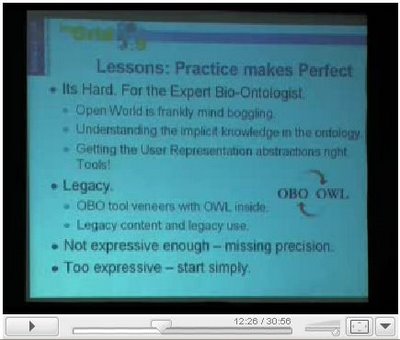
In a recent meeting with Prof. Carole Goble we discovered, that in her keynotes, she's using a screenshot (around minute 12) coming from the prototype of the SWAN (Semantic Web Applications in Neuromedicine) application. Which is the project I am working on now for Mass General Hospital and Harvard Medical School.
Carole Goble is a Professor in the School of Computer Science. She is co-leader of the Information Management Group. She has a leading role in the Semantic Web, e-Science and the Semantic Grid. She applies technical advances in knowledge technologies and workflow systems to solve information management problems for Life Scientists and other scientific disciplines. She was co-PC chair of WWW2006 and is an EIC of the Elsevier’s Journal of Web Semantics.
She is the director of the large UK e-Science my Grid/Taverna programme of work for workflow based middleware for Life Scientists (http://www.mygrid.org.uk). My Grid uses semantic technologies for service and workflow discover and metadata management of workflow-based experiments. My Grid is now part of the Open Middleware Infrastructure Institute UK (http://www.omii.ac.uk); Carole is the chair of this Institute (of 40+ software developers), which has been funded to harden and support developments from the UK’s e-Science programme. She is the co-chair of the Open Grid Forum Semantic Grid Research Group, and the Technical Director of the EU Strep OntoGrid (http://www.ontogrid.net), which has developed the Semantic-Open Grid Service Architecture (S-OGSA) framework for Semantic Grids.
Tuesday, December 13, 2005
Estonia and Orkut
Recently I have been to Estonia for a short vacation [1][2]. It is a country of about 1.356.000 citizens located in the north of Europe on the Baltic sea. Well the interesting thing is that Milan (Italy) itself has more inhabitants than whole Estonia and if you look at Orkut community Estonian users are about 0,44% of the total.
It has been written about "Orkut Brazilian invasion" [3], and about Estonia numbers in the same article "orkut has turned most popular in little Eastern-European country Estonia where a little more than 3% (June 2005) of the population are registered orkut users. Brazil holds the second place (about 2.5% of the population in the south east of the country)"
Estonian users are quite the same of Portugal (0.45%) users... but Portugal (more than 10.000.000 inhabitants) is about 8 times Estonia in terms of citizens. And what about Canada? Canada has about 30.000.000 citizens and in orkut it is around 0.53%.
Orkut users from Estonia are usually between the age of 17 and 23... thus, given the whole population [4] we have about 140.000 units in that range. A good part of them is in orkut... interesting...
[1] Fotoalbum
[2] Blog of my trips
[3] Wikipedia
[4] Population distribution in Estonia
It has been written about "Orkut Brazilian invasion" [3], and about Estonia numbers in the same article "orkut has turned most popular in little Eastern-European country Estonia where a little more than 3% (June 2005) of the population are registered orkut users. Brazil holds the second place (about 2.5% of the population in the south east of the country)"
Estonian users are quite the same of Portugal (0.45%) users... but Portugal (more than 10.000.000 inhabitants) is about 8 times Estonia in terms of citizens. And what about Canada? Canada has about 30.000.000 citizens and in orkut it is around 0.53%.
Orkut users from Estonia are usually between the age of 17 and 23... thus, given the whole population [4] we have about 140.000 units in that range. A good part of them is in orkut... interesting...
[1] Fotoalbum
[2] Blog of my trips
[3] Wikipedia
[4] Population distribution in Estonia
Saturday, December 03, 2005
Welkin more stylish? [3]
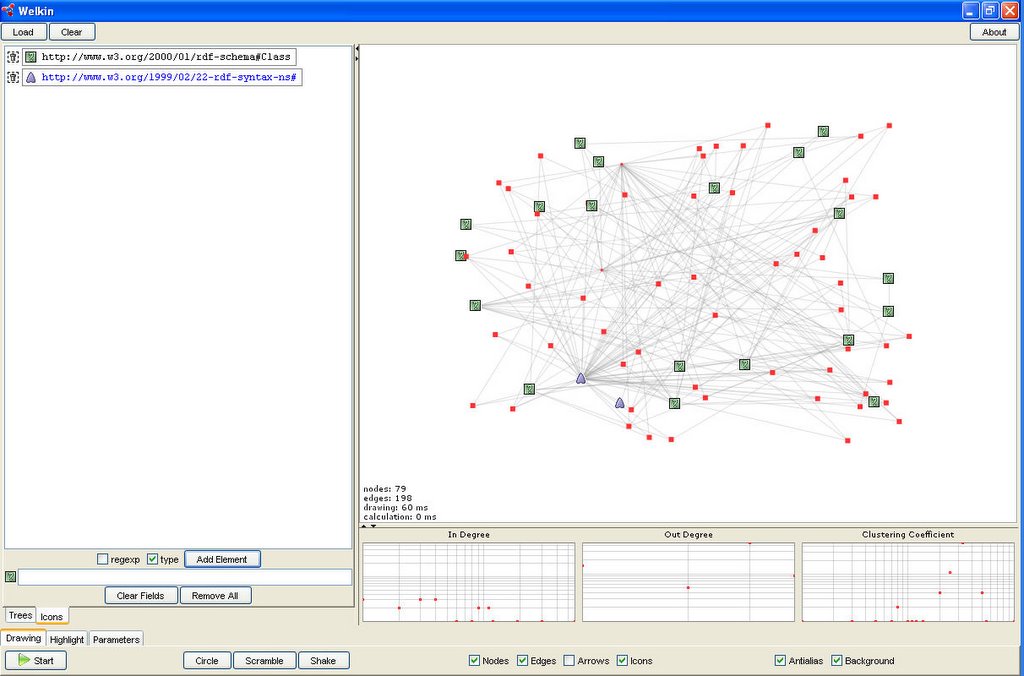
This is the second developement step for adding in welkin icons to resources of a particular rdf type and to resources with the URI starting with a particular substring (you can download it from svn of the Simile Project).
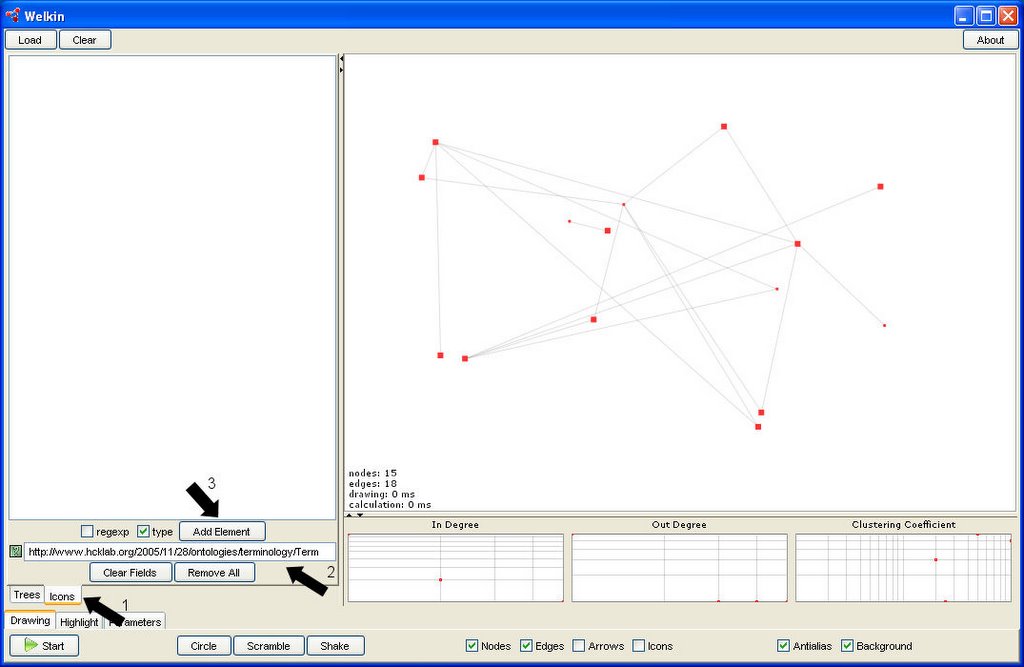
It is possible to associate an icon to all the resources with the URI starting with a particular substring:
1) Click on the "icons" tab on the left of the welkin interface
2) Type the substring
3) Check the "regexp" checkbox
4) Click on the "Add Element" button

The substring of the new element will be displayed in blue (the "type" element will be in black).
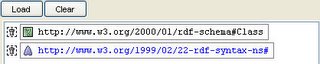
The final result:
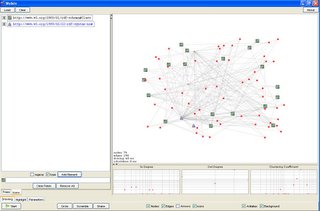
It is possible to associate an icon to all the resources with the URI starting with a particular substring:
1) Click on the "icons" tab on the left of the welkin interface
2) Type the substring
3) Check the "regexp" checkbox
4) Click on the "Add Element" button

The substring of the new element will be displayed in blue (the "type" element will be in black).

The final result:
Sunday, November 27, 2005
Welkin more stylish? [2]
This is the first developement step for adding in welkin icons to resources of a particular rdf type
(you can find it on svn of the Simile Project)
It is possible to change the icon to be displayed by clicking on the icon image. It is suggested to upload only icons of 16x16 pixels (14x14 maximum) to not have overlapping in the chart.

Clicking on the "trash" icon it is possible to delete one of the defined icon element.

Double clicking on the uri it is possible to modify an already defined icon element.

(you can find it on svn of the Simile Project)
It is possible to change the icon to be displayed by clicking on the icon image. It is suggested to upload only icons of 16x16 pixels (14x14 maximum) to not have overlapping in the chart.
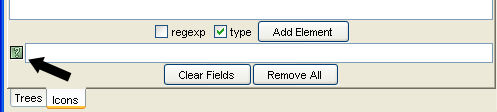
Clicking on the "trash" icon it is possible to delete one of the defined icon element.

Double clicking on the uri it is possible to modify an already defined icon element.

Welkin more stylish? [1]
This is the first developement step for adding in welkin icons to resources of a particular rdf type
(you can find it on svn of the Simile Project)
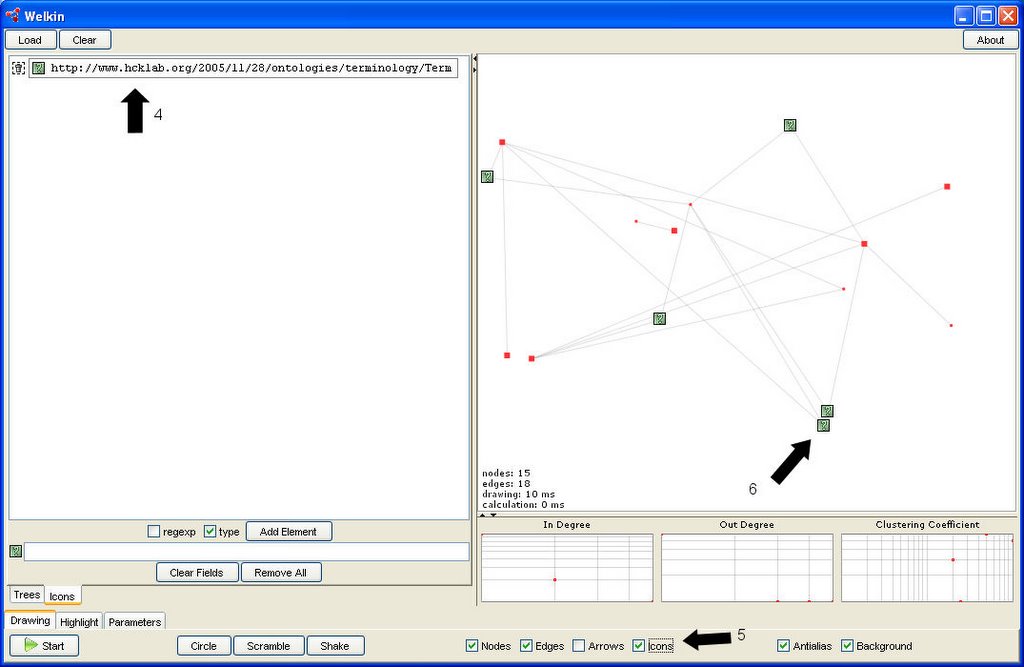
When a model as been loaded it is possible to associate an icon to all the resources of the specified rdf type:
1) Click on the "icons" tab on the left of the welkin interface
2) Type the URI of the desired type to associate to the icon on the left
3) Click on the "Add Element" button
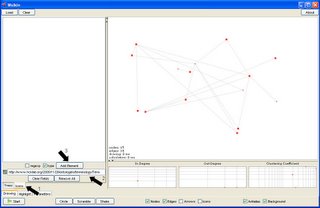
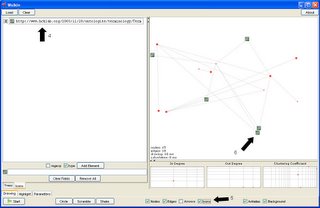
After performing the above steps the new icon element will be displayed on the panel on the top left (4). Enabling the icons drawing (5), the resources that are of the specified type will be displayed with the selected icon (6).
(you can find it on svn of the Simile Project)
When a model as been loaded it is possible to associate an icon to all the resources of the specified rdf type:
1) Click on the "icons" tab on the left of the welkin interface
2) Type the URI of the desired type to associate to the icon on the left
3) Click on the "Add Element" button
After performing the above steps the new icon element will be displayed on the panel on the top left (4). Enabling the icons drawing (5), the resources that are of the specified type will be displayed with the selected icon (6).
Saturday, November 12, 2005
Linotype going to be "semantic"
Linotype software was written by Stefano Mazzocchi for his own blog [1]. It is implemented as a Cocoon application and the original software is available at [2].
Working on the same software Stefano and I started to introduce semantic annotation of the content through rdf/a [3].
At the location [4] it is available a branch in which an initial integration
of rdf/a is under developement.
[1] http://www.betaversion.org/~stefano/linotype/
[2] http://simile.mit.edu/repository/linotype/trunk/
[3] http://www.w3.org/2001/sw/BestPractices/HTML/2005-rdfa-spec
[4] http://simile.mit.edu/repository/linotype/branches/rdf-a/
Working on the same software Stefano and I started to introduce semantic annotation of the content through rdf/a [3].
At the location [4] it is available a branch in which an initial integration
of rdf/a is under developement.
[1] http://www.betaversion.org/~stefano/linotype/
[2] http://simile.mit.edu/repository/linotype/trunk/
[3] http://www.w3.org/2001/sw/BestPractices/HTML/2005-rdfa-spec
[4] http://simile.mit.edu/repository/linotype/branches/rdf-a/
Friday, November 04, 2005
Piggy Bank and Solvent... Welcome Semantic Web!
Three years ago I started my trip through languages and technologies for ontologies definition and usage. I read several papers on this topic and after a certain period I felt quite sad in realizing the high price to pay to obtain a benefit from "semantic add ons".
The idea was to define a sort of perfect micro-world where everything has a well defined meaning. And obviously, after a certain period I gave up. At that time Jena was something really complex to understand to me and Sesame was only a "magic" word. I took a look at the powerful and, in the same time, cryptic KIF formalism, at DAML and DAML+OIL. For some reasons (besically one :D... the serialization in XML was driving me crazy) RDF sounded too weird.
Then OWL came out and I started reading again... n3... Rio... Sesame. The "Semantic Web" concept was still something not well defined and my impression was that OWL was "a light version" of the old-style ontology languages coming from the AI world...
I was wrong, look at the Simile Project... with Piggy Bank and Solvent ... the "semantic web" started to rock!
And now it is clear "Semantic Web" is everything you want it to be ;)
The idea was to define a sort of perfect micro-world where everything has a well defined meaning. And obviously, after a certain period I gave up. At that time Jena was something really complex to understand to me and Sesame was only a "magic" word. I took a look at the powerful and, in the same time, cryptic KIF formalism, at DAML and DAML+OIL. For some reasons (besically one :D... the serialization in XML was driving me crazy) RDF sounded too weird.
Then OWL came out and I started reading again... n3... Rio... Sesame. The "Semantic Web" concept was still something not well defined and my impression was that OWL was "a light version" of the old-style ontology languages coming from the AI world...
I was wrong, look at the Simile Project... with Piggy Bank and Solvent ... the "semantic web" started to rock!
And now it is clear "Semantic Web" is everything you want it to be ;)
Subscribe to:
Posts (Atom)